OutletIQ/Beverage distributor software

Category

Beverage distributor software for field sales and retail execution

Beer, wine, spirits and soft drinks distributors live or die on what happens in the outlet. This page explains what beverage distributor software does in the field, what to look for before you buy, and where OutletIQ fits and where it does not.

Beverage distributor software is the set of systems a beer, wine, spirits or soft drinks distributor uses to sell into outlets, deliver stock and account for it. The field sales and retail execution layer is the part your reps carry. It plans which outlets get visited, proves the visit happened, records what was on the shelf and whether the promotion was running, and captures the order at the price head office set.

Most distributors already have something for the warehouse and the invoice. The gap is usually the field: visits recorded on trust, orders phoned or messaged in, promotions nobody can check, and a rep app that stops working in the cellar. That gap is what this page is about.

Last reviewed September 2026.

The category

Drinks distributor software: what the field layer has to do.

A drinks distributor sells the same way whether the product is lager, a Rioja or a premium gin. A rep walks into an outlet, checks the fixture, talks to the buyer and takes an order. Software earns its place by making each of those steps reliable.

Plan the trade

On trade and off trade outlets need different call frequencies. Journey plans and routes turn coverage into a plan instead of a habit.

journey plansroutes

Prove the call

A visit should count only when the evidence says the rep was there, for long enough, on a phone that was not faking its location.

geofencedwellfake-GPS

Audit the fixture

Range listed, facings held, competitor pricing, chiller and back bar placement, and whether the point of sale went up.

availabilityPOSphotos

Take the order right

Price books and deals set centrally. The rep sells; the server calculates. No handset discounts, no duplicate orders on a weak connection.

price bookserver-side totals

Control the money

Free stock, expenses and purchase orders go through an approval chain with a record, not a message thread.

approvalsLPO + PDF

Work with no signal

Cellars, basements, rural routes and busy venues all kill data. The app has to carry on and sync later.

offline-firstoutbox sync

Buyer's checklist

Beverage distribution software: what to look for before you buy.

1. Verified visits, not self reported ones

Ask every vendor what exactly it checks before a visit counts, and what happens when a check fails. A clock-in button with a GPS pin is not verification. Look for a geofence around the outlet, a minimum time on site, detection of mock location apps, and a review queue where flagged visits wait for a manager with the reason attached. If failed checks are quietly counted as coverage, the coverage report is fiction.

2. Offline working that is designed in

Drinks reps spend a lot of their day underground or in venues with thick walls. There is a difference between an app that tolerates a dropped signal and one that assumes it. Ask what the app does at zero bars for six hours: can the rep open the outlet, run the audit, build the order and move on, with everything syncing later and nothing lost or duplicated.

3. Order capture with server-side pricing

Beverage margins are thin and deals are everywhere: volume breaks, listing fees, seasonal promotions, customer specific price lists. If the handset calculates the total, the handset can be wrong or can be edited. The safer design is that the rep chooses products and quantities and the server recomputes the total from the current price book on submit. Ask where the price is calculated when the rep presses send.

4. Promotion and POS audits you can compare

Brand owners pay distributors to execute. That means proving the promotion ran, the display went up and the range was listed. Audits should be structured forms, not free text, so answers can be compared across outlets, reps and weeks. Photos should be attached to the visit, and last visit's answers should carry forward so reps confirm rather than retype.

5. Approvals with a paper trail

Free stock, sampling, expenses and purchase orders are where money leaks. Look for configurable multi-stage approval chains and a document generated at the end, so finance sees a signed off record rather than a screenshot.

6. Honest scope

No single tool does everything a distributor needs. Ask each vendor directly what it does not do, and how it connects to the systems that do.
OutletIQ · Overview
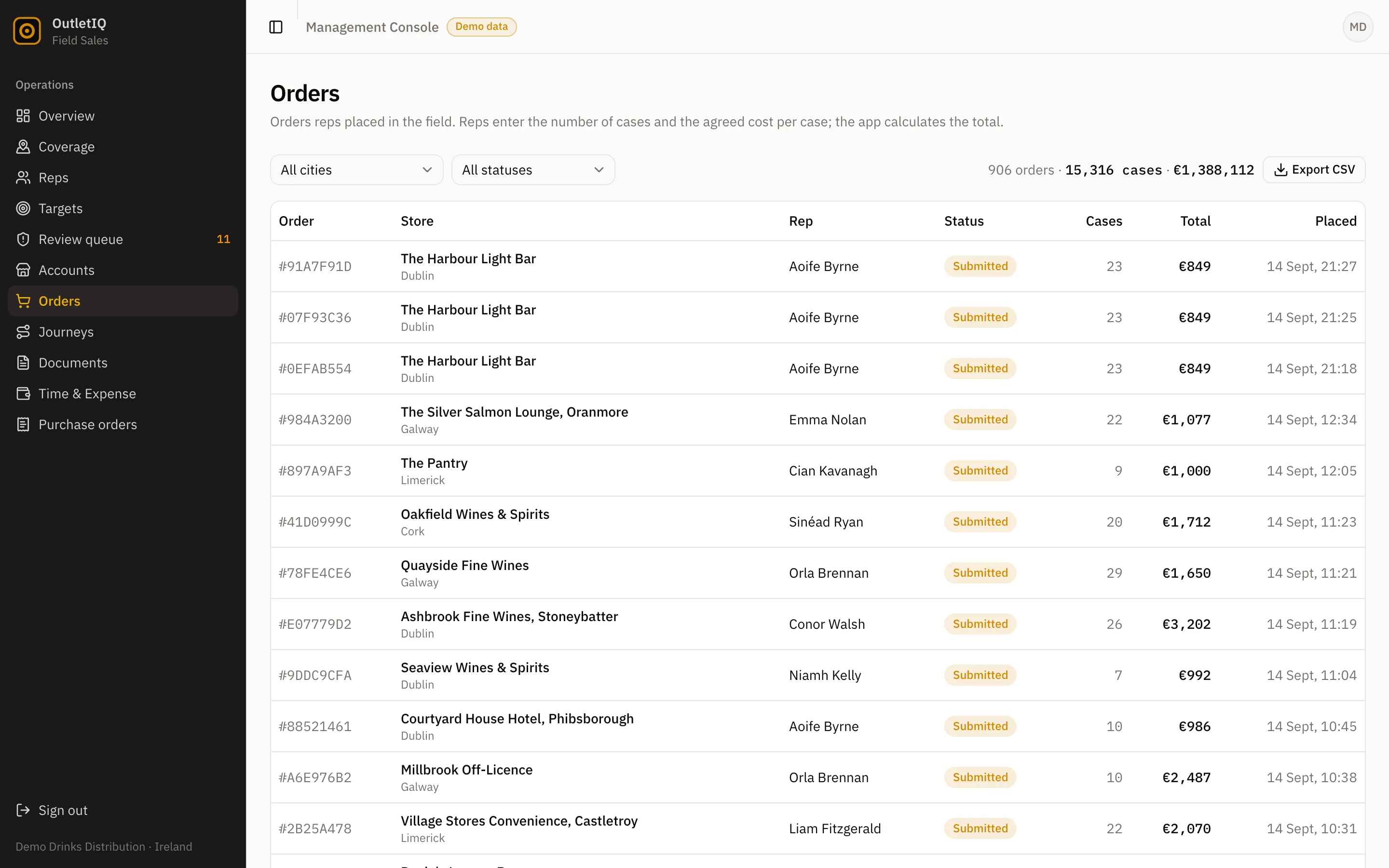
OutletIQ manager console orders view: field orders captured by reps with server calculated totals and approval status

Where it fits

Which beverage distribution system does which job.

Most drinks distributors end up running several systems. This table is a plain map of the usual split, and where OutletIQ sits in it.

Table 1. Typical systems in a beverage distribution business and whether OutletIQ covers each job. Last reviewed September 2026.
JobUsually handled byOutletIQ
Outlet visit planning and verificationField sales or retail execution softwareYes. Journey plans, routes, and four signal visit verification with a review queue.
Store audits, promotions and POSRetail execution softwareYes. Configurable sectioned audit forms with photos, free stock and promotional compliance recorded against the visit.
Order capture in the outletField sales software or an ERP mobile add-onYes. Catalogue and cart, server-side totals from the price book, idempotent submission, CSV export.
Approvals and purchase ordersERP, finance tools or emailYes for field side approvals. Multi-stage chains for expenses, leave, stock requests and LPOs, with a PDF on final sign-off.
Stock, warehouse and inventoryERP or warehouse management systemNo. Keep it in your ERP or WMS.
Invoicing, credit control and accountsERP or accounting softwareNo.
Delivery routing, drivers and proof of deliveryDelivery or route accounting softwareNo. OutletIQ routes are for sales reps, not delivery vehicles.
Van sales route accountingRoute accounting or DSD softwareNo. OutletIQ does not settle vans, print invoices or collect payments.
Excise, duty and licensing recordsERP or specialist compliance toolsNo.

OutletIQ rows reflect the features described on the OutletIQ homepage. Scope and integrations for a specific deployment are confirmed in a written quote.

How OutletIQ does it

Wine and spirits distributor software for the rep and the manager.

Wine and spirits distribution adds pressure to every point above. Unit values are higher, so a wrong price or a phantom free case costs more. Listings are fought for, so proof that the range is on the shelf matters to the brand owner. And much of the trade is on premise, in bars, hotels and restaurants where signal is poor and the buyer has five minutes. OutletIQ was built for that kind of field operation, in drinks and wider FMCG.

The rep app

  • Today's route first. The rep opens to assigned outlets, or builds a route with nearest unvisited suggestions and distance estimates.
  • Clock in that means something. The visit only counts when GPS places the rep inside the outlet geofence, and the 30-minute dwell check filters drive-bys.
  • Audit, then order. Run the sectioned audit with photos, then build the order in the cart. Prices are confirmed server-side on submit.
  • Their own phone. Bring-your-own-device on everyday Android, deliberately light on data and storage.

The manager console

  • Coverage by territory on a live map, so you can see which outlets were actually worked.
  • A review queue that shows exactly why each visit was flagged, with photo evidence.
  • Every order with server-side totals and CSV export for your ERP or finance team.
  • Approvals and LPOs through configurable multi-stage chains, with a PDF emailed on final approval.
  • A weekly summary you can copy straight to WhatsApp.

What OutletIQ does not do. It is not an ERP. It does not manage your warehouse or stock levels, issue invoices, run credit control, plan delivery vehicles, settle van sales or keep excise and duty records. It also does not score shelf photos automatically with image recognition. If you need those jobs done, keep or buy the system that does them and connect OutletIQ to it. Orders already export to CSV, and integration with your existing systems is scoped as part of the quote.

Soft drinks, beer and mixed portfolios

High frequency categories like soft drinks and beer put the weight on coverage and speed: more calls per day, smaller orders, more outlets that need checking for chiller placement and availability. Journey plans with week and month views, carried forward audit answers and a one hand rep app all exist to shorten the call without losing the evidence. A mixed portfolio distributor can run one audit form for spirits and another for soft drinks, because forms are configurable.

Comparing vendors

If you are shortlisting, we have written sourced comparisons built from each vendor's own public pages: OutletIQ vs Repsly, OutletIQ vs Skynamo and a wider roundup of Repsly alternatives. For the general category, see retail execution software and field sales software.

Last reviewed September 2026.

Questions

Beverage distributor software, asked and answered.

What is beverage distributor software?

Beverage distributor software is the set of systems a drinks distributor uses to sell, deliver and account for beer, wine, spirits and soft drinks. Field sales and retail execution software is the part your reps carry: it plans outlet visits, verifies they happened, records audits and promotions, and captures orders at the price your business set.

Is OutletIQ an ERP or a route accounting system?

No. OutletIQ does not run your warehouse, stock, invoicing, delivery routes or route accounting. It covers the rep in the outlet and the manager at head office. If you already run an ERP or a distribution system, OutletIQ should sit alongside it, and integration is part of the scoping conversation.

Does it work in pubs, off licences and rural outlets with no signal?

Yes. The OutletIQ rep app is offline-first. It runs on a local database and queues every action in an outbox that syncs when signal returns, so a cellar bar or a rural route loses nothing.

Can reps change prices or discounts on an order?

Not in OutletIQ. The device never sets a price. Order totals are recomputed server-side from the price book, and submissions are idempotent, so a weak connection cannot create a duplicate order.

Can it track promotions and point of sale in the outlet?

Yes. Store audits are configurable sectioned forms covering availability, shelf facings, competitor prices and promotions, with photos attached to the visit. Free stock and promotional lines are recorded against the outlet and the visit so a manager can see what went out and where it landed.

How does it prove a rep actually visited the outlet?

Four signals are cross-checked on every visit: GPS geofencing at the outlet, a 30-minute dwell check, mock-GPS detection and location-fix density. Anything suspicious is flagged with its reason and sent to the manager review queue with the photo evidence attached.

Does OutletIQ handle excise, duty or licensing compliance?

No. Duty, excise and licence records belong in your ERP or finance system. OutletIQ records the visit, the audit and the order.

How much does it cost?

OutletIQ is a monthly subscription quoted per operation. Team size and rollout scope move the number, so pricing is written against your actual deployment rather than published as a list.

Book a demo

See it on your own outlets.

A 20-minute walkthrough of the rep app and the manager console, then a straight conversation about whether OutletIQ fits your drinks distribution operation and what it should connect to.

Or email fionn@fmops.ie

Keep reading

The rest of OutletIQ.