OutletIQ/Retail execution software/Retail audit software

Store audits

Retail audit software that produces answers you can compare

A store audit is only useful if this week's answer can be compared with last week's, and one rep's with another's. This page explains what retail audit software should do, how to design an audit form that holds up, and where OutletIQ fits and where it does not.

Retail audit software is the app a rep or merchandiser uses to record what is happening in an outlet, in a fixed set of questions, with photos as evidence. Typical sections cover product availability, shelf facings, pricing, promotions and point of sale, and what the competition is doing. Because the questions are the same every time, answers can be compared across outlets, reps and weeks rather than read one at a time.

Two things decide whether a store audit app is worth having. The first is whether the audit was actually done in the store, which is a visit verification problem. The second is whether the form produces answers that can be added up, which is a form design problem. This page covers both.

Last reviewed October 2026.

In the field

What a store audit app has to get right.

Most audit tools can show a form on a phone. The difference is in what happens around the form: proving where it was filled in, keeping it short enough to finish, and making the answers usable afterwards.

Structured questions

Yes or no, numbers, single and multiple choice, free text and photos. Structured answers can be compared; paragraphs cannot.

question typescomparable

Sections that match the shop

Availability, facings, pricing, promotions, point of sale and competitors as separate sections, so the rep moves through the outlet in a fixed order.

sectioned forms

Questions that only appear when needed

A follow up question shows only when an earlier answer calls for it, so a rep is not asked why a display is missing when it is there.

conditional questions

Last visit carried forward

Last visit's answers carry forward, so the rep confirms what changed instead of retyping the whole store.

carry forward

Photos tied to the visit

Photos are attached to the visit record, so a manager sees the shelf, the answers and the visit evidence together.

photosreview queue

Proof it was done in store

The audit sits inside a verified visit: geofence, minimum dwell time, mock-GPS detection and location-fix density.

verified visit

Buyer's checklist

Retail audit software: what to look for before you buy.

1. Is every audit tied to a verified visit?

An audit filled in from the car park, or from home the next morning, looks the same as a real one unless the software checks. Ask what has to be true before a visit counts, and whether failed checks reach a manager with the reason attached.

2. Can you write your own forms?

Every distributor's portfolio and outlet types are different. Ask whether forms are configurable, whether you can split them into sections, mark questions as required and show follow up questions only when an earlier answer calls for them.

3. Are the answers structured?

If most questions are free text, nobody will ever read them in aggregate. Prefer yes or no, numbers and choice lists, and keep free text for the one question where nuance matters.

4. How long does the audit take in the store?

Ask a vendor to time a real audit on a phone. Carried forward answers, conditional questions and short sections are what keep an audit under a few minutes on a busy call.

5. Does it work without signal?

Stores with thick walls, basements and rural outlets drop data. The audit, its photos and the order taken on the same call should be saved on the phone and sync later without loss.

6. What does it not do?

Some vendors score shelf photos automatically with image recognition; many do not. Ask directly, and ask how audit data leaves the system.
OutletIQ · Review
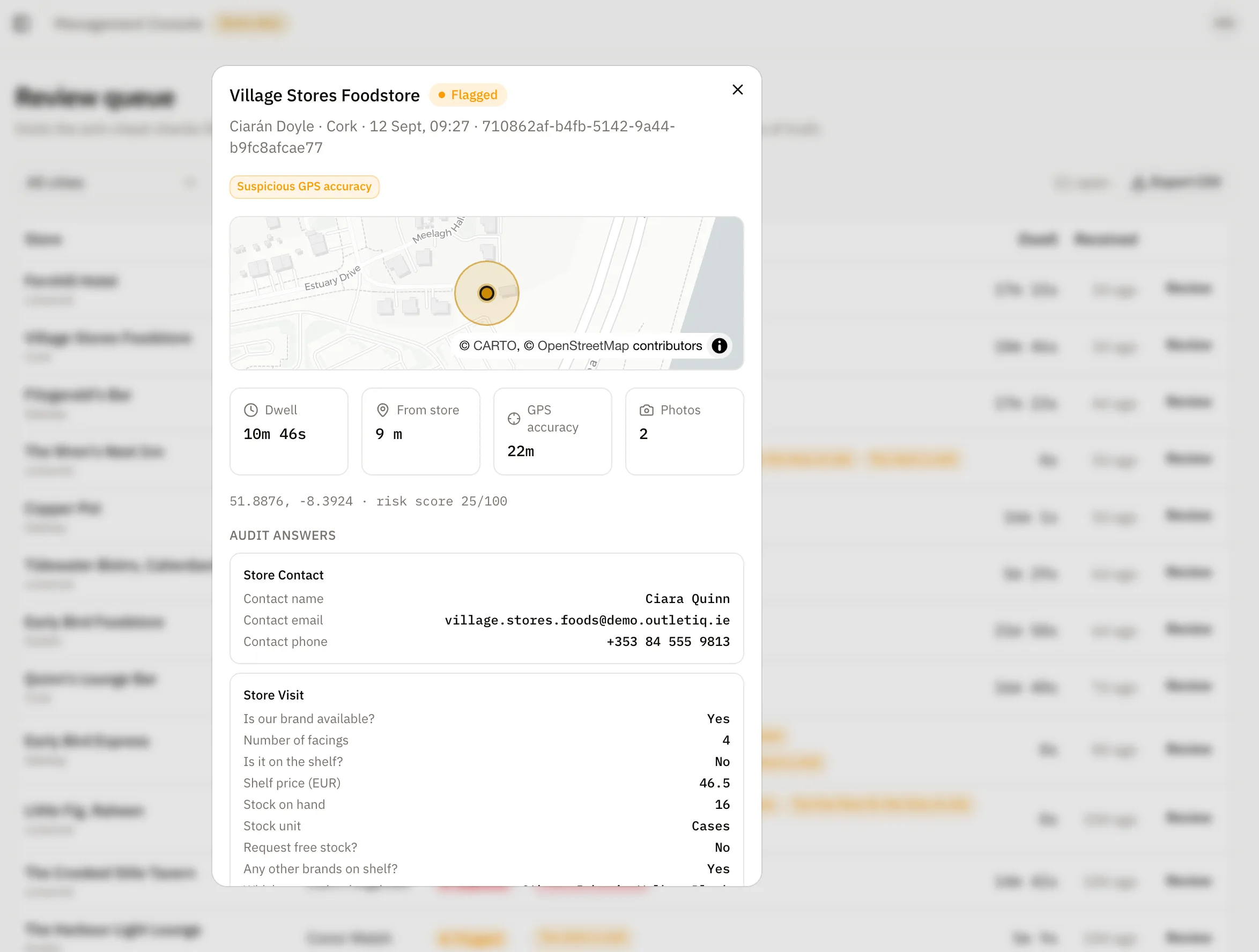
OutletIQ manager console: a flagged visit opened for review, with the map, dwell time, distance from the store, GPS accuracy, photos and the rep's audit answers

Where it fits

A store audit template you can adapt.

A worked example of a drinks and FMCG store audit, section by section, with the question type that keeps each answer comparable. Use it as a starting point; every portfolio needs its own version.

Table 1. Example store audit sections, sample questions and question types. Last reviewed October 2026.
SectionExample questionsQuestion type
AvailabilityIs each core product on shelf? Which products are out of stock?Yes or no per product; multiple choice for out of stock lines
Shelf facingsHow many facings does each core product have? How many does the main competitor have?Number
PricingWhat is the shelf price of each core product? What is the competitor's price?Number
PromotionsIs the agreed promotion running? If not, why not?Yes or no, with a follow up choice list shown only when the answer is no
Point of saleIs the agreed display or point of sale in place? Photo of the display.Yes or no, plus photo
Cold space or back barWhere do our products sit in the chiller or on the back bar?Single choice (for example eye level, top, bottom, not present)
Competitor activityIs there competitor promotional activity? Which brand?Yes or no, with a follow up shown only when the answer is yes
Wrap upWhat did you change on this visit? Anything the manager should know?Multiple choice, plus one short free text field

This template is an example of form design, not a fixed OutletIQ form. In an OutletIQ deployment, audit forms are set up around your portfolio and outlet types.

How OutletIQ does it

How OutletIQ runs store audits.

OutletIQ is field sales and retail execution software for drinks and FMCG distributors. The audit is one step of the call: the rep proves the visit, runs the audit, takes the order and moves on, and the manager sees all of it on one record.

The rep app

  • Clock in first. The audit belongs to a visit, and the visit only counts when GPS places the rep inside the outlet geofence for the minimum dwell time (10 minutes by default, set per outlet).
  • Sectioned forms. Text, number, yes or no, single choice, multiple choice and photo questions, grouped into sections, with required questions and follow ups that appear only when an earlier answer calls for them.
  • Carried forward answers. Last visit's answers carry forward, so the rep confirms what changed.
  • Offline. The audit and its photos are saved on the phone and sync when signal returns, on everyday iPhone and Android phones.

The manager console

  • A review queue where flagged visits wait with the reason, the map, the audit answers and the photos together.
  • Coverage by territory on a live map, so you can see which outlets were actually audited.
  • The order on the same record as the audit, with server-side totals and CSV export.
  • A weekly summary you can copy straight to WhatsApp.

What OutletIQ does not do. OutletIQ does not score shelf photos automatically with image recognition. Photos are evidence for a manager to look at, attached to the visit. It is also not a planogram design tool or a market research panel. Forms for each deployment are set up with you as part of the rollout.

Audits and orders on the same call

For a distributor, the audit and the order are one conversation. A rep who sees an empty shelf should be able to sell the gap straight away. In OutletIQ the audit and the order are captured on the same visit, so a manager can see what was missing and what was ordered to fix it.

Related reading

For the wider category, see retail execution software and field sales software. For drinks specific audits, see the guides for wine, beer and spirits distributors.

Last reviewed October 2026.

Questions

Retail audit software, asked and answered.

What is retail audit software?

Retail audit software is the app a rep or merchandiser uses to record what is happening in a store, such as availability, shelf facings, prices, promotions and point of sale, in a fixed set of questions with photos. Because the questions are fixed, the answers can be compared across outlets, reps and weeks.

What is a store audit app?

A store audit app is retail audit software on a phone or tablet. The rep opens the form in the store, answers each section and attaches photos. The best ones work offline and tie each audit to a verified visit.

What should a store audit include?

Most drinks and FMCG audits cover availability, shelf facings, pricing, promotions, point of sale, cold space or back bar position, competitor activity and a short wrap up. Keep answers structured: yes or no, numbers and choice lists.

How do I know the audit was done in the store?

Four signals are cross-checked on every visit: GPS geofencing at the outlet, a minimum dwell time (10 minutes by default, set per outlet), mock-GPS detection and location-fix density. Anything suspicious is flagged with its reason and sent to the manager review queue with the photo evidence attached.

Can audit questions change depending on earlier answers?

Yes. In OutletIQ a question can be set to appear only when an earlier answer matches, so follow ups show when they are needed and stay hidden when they are not.

Does OutletIQ score shelf photos automatically?

No. OutletIQ captures audit photos and attaches them to the visit record for the manager review queue, but it does not score shelf images automatically.

Does it work without signal?

Yes. The OutletIQ rep app is offline-first. Audits, photos and orders are saved on the phone and sync when signal returns.

How much does it cost?

OutletIQ is a monthly subscription quoted per operation. Team size and rollout scope move the number, so pricing is written against your actual deployment rather than published as a list.

Book a demo

See it on your own outlets.

A 20-minute walkthrough of the rep app and the manager console, including a store audit from clock in to review, then a straight conversation about whether OutletIQ fits your operation.

Or email fionn@fmops.ie

Keep reading

The rest of OutletIQ.